Mention "RAG" and the acronym sounds like an insult. Retrieval-augmented generation sits awkwardly in conversation. People who aren't familiar with AI don't realize that RAG is how commercial LLM services create the illusion of "continuous learning." RAG is the infrastructure behind the curtain that extends knowledge beyond the training cutoff in the model weights. People who are familiar with AI need to see OrthoSystem.ai in action to understand how it differs from every other chatbot with a RAG attached. In both cases, the solution is the same: let someone ask OrthoSystem.ai question and deliver surprise and delight. It's what we learned in elementary school: show not tell.
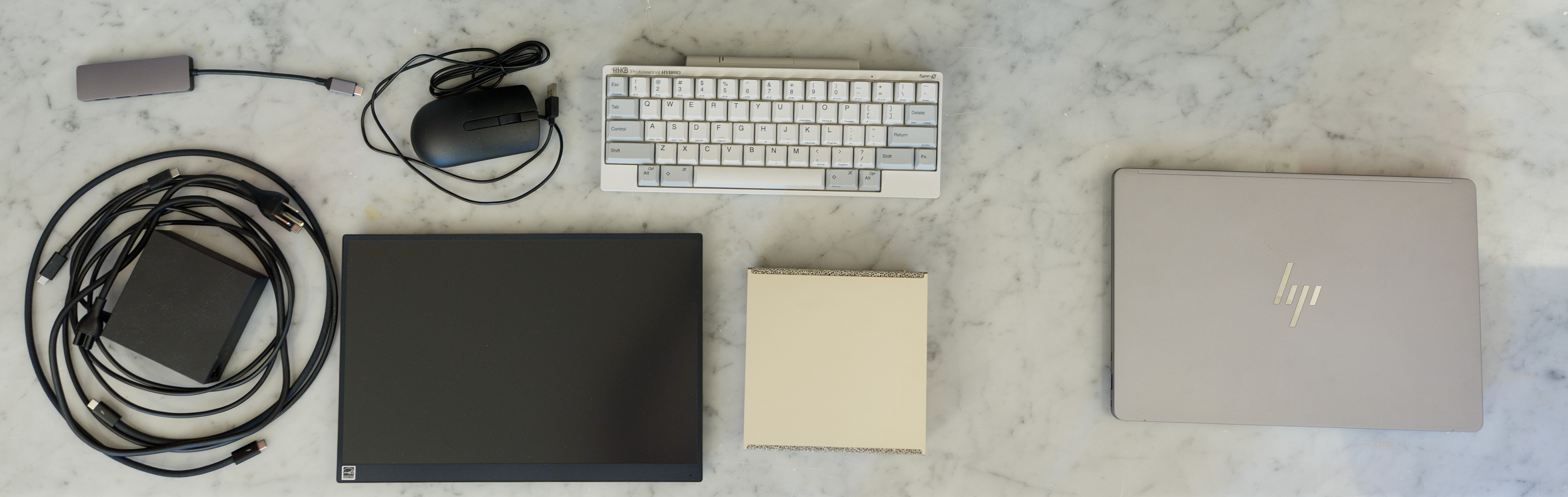
The NVIDIA DGX Spark is a remarkable piece of hardware for this purpose, but live demos require carrying a power brick, my keyboard, a USB-C cable for that keyboard, a portable monitor, with another USB-C cable for the monitor, a cheap wired USB-A mouse, and a cheap USB-C to USB-A hub for the mouse. Bluetooth isn't reliable enough for live demos (what if you run out of batteries?). So I arrive, set up the hardware while trying to hold a conversation, plug in cables, wait for boot, explain what I'm doing while also doing it. It works, but it is clunky. First world problems, I know.
Still, what I wanted was a laptop that could run the full OrthoSystem stack—not a thin client connecting to the cloud, not a VPN tunnel back to my home DGX Spark, but a self-contained machine that opens anywhere, Wi-Fi present or not, and is ready to go and answer questions about orthopaedic surgery entirely offline.
A laptop version of the GB10 that powers the DGX Spark is coming at some point. If it was available, it would have been the obvious choice. But I had a faculty meeting on February 4 where I wanted to demo OrthoSystem.ai for colleagues, so only two realistic options existed in January 2026: a MacBook Pro M4 Max with 128GB of unified memory, or something based on AMD's Strix Halo platform.
The MacBook seems like the obvious choice initially. Elegant hardware, familiar ecosystem -- I'm already on Apple for my phone, tablet, and I also have a M4 Mac Mini. PyTorch MPS is supposed to work seamlessly for AI workloads. But Apple Silicon has no enterprise scaling path. Furthermore, OrthoSystem.ai is built around microservices running in Docker containers and MacOS won't give you GPU access inside a Docker container. So, AMD was the winner by default.
Then HP ran a promotion. $3000 for a ZBook Ultra G1a with 128GB of unified memory, the 2.8K OLED screen, and the Ryzen AI MAX+ PRO 395. This is the workstation version of AMD's Ryzen AI MAX+ 395 rather than the consumer variant. No Precision Boost Overdrive. No EXPO memory overclocking. No Curve Optimizer voltage offsets for undervolting. This would be the responsible version, designed for sustained workloads rather than benchmark spikes. When I discovered that HP publishes an official OEM Ubuntu 24.04 LTS image for the machine, the order was placed.
I was halfway through a two-week staycation at the time. This was vacation from clinics and surgery just to spend some time working on transitioning OrthoSystem.ai from research code into a design-controlled product. Even before the ZBook arrived, I started researching how to port my NVIDIA NGC-based setup to AMD's ROCm platform.
Specifications
| Platform | HP ZBook Ultra G1a |
| APU | AMD Ryzen AI MAX+ PRO 395 |
| CPU | 16 cores / 32 threads (Zen 5) |
| GPU | 40 RDNA 3.5 Compute Units |
| Memory | 128 GB unified LPDDR5-8000 |
| Display | OLED, 120Hz |
| ISA | AVX512 · ROCm 7.2 |
| Price (Jan. 2026 / current) | $3,000 / $4,689 |
First Impressions
The ZBook arrived in a very stealable retail box with a shipping label stuck directly on it. It's heavier and denser than it looks, even denser than my 2020 HP Omen 15, even, which initially communicates quality. Full disclosure, my frame of reference is the VAIO SX12 and my wife's SX14-R, both of which are remarkably light laptops with MIL-STD-810H durability testing so everything feels heavier than those.
Opening the lid undercuts the first impression. The OLED panel itself is fine, but the layer on top of it isn't quite flat—there's a subtle torsion that creates a funhouse mirror effect in reflections. The mechanical privacy shutter for the webcam feels flimsy. For a laptop with a nearly $5,000 MSRP, this isn't the experience you expect. I suspect HP shaved weight from the screen assembly to compensate for the dense body, and the rigidity suffered.
The display is otherwise quite good. The 120Hz refresh rate makes scrolling insanely smooth, and the OLED viewing angles are exactly what you want when demo'ing something in a small office. There's a faint sub-pixel grid on white backgrounds and occasional red "specks" which I think is from the touch panel digitizer, but your brain filters both out within minutes so I wasn't bothered by it.
The cooling system can get very loud, which I found reassuring rather than concerning. When you're showcasing software, the loud fans tells everyone the level of computational horsepower that's needed for your product. You just don't want anything to crash! Of course, in an era where RAM pricing seems to skyrocket faster than even the hottest stocks on the S&P 500, 128GB system RAM remains a key differentiating factor.
What OrthoSystem.ai Actually Does
Almost no production LLM runs in isolation. The chat interfaces people use daily: Claude, Gemini, Co-Pilot, and ChatGPT aren't pure LLMs generating responses entirely from training data and internal weights. When you ask these services a question, the underlying model does generate text from patterns learned during training, but its knowledge is frozen in time, typically months before the model is publicly released. To give the consumer-facing services a sense of being current and knowledgeable is the infrastructure surrounding the model which can include curated documents, web search, or other tools which are retrieved when you ask questions.
Retrieval-augmented generation is that infrastructure. There are a lot of variants on RAG (including CAG) but the general concept is that before the LLM generates a response, a separate retrieval system searches relevant documents and injects pertinent passages directly into the prompt. It's as if you were giving the model the answers along with your question. The model then generates an answer grounded in those actual sources rather than purely relying on statistical patterns from training. This is how ChatGPT appears to "continuously learn" -- it combines an advanced, but frozen LLM with live web search and a continuously updated knowledge document at the time of each response.
OrthoSystem.ai applies this same architecture to orthopaedic surgery. It doesn't answer clinical questions from a training database. It retrieves specific passages from validated sources, like textbooks, and cites them by document and page number. The retrieval pipeline has three stages, and understanding them is necessary to interpret the benchmarks that follow.
Embedding
The mathematics that make modern LLMs possible emerged from university research. In the 1950s, Charles Osgood and his team at the University of Illinois asked hundreds of undergraduates to rate concepts—words like lady, father, fire, boulder, tornado, sword—on fifty different scales: good–bad, hard–soft, hot–cold, sweet–sour. Across multiple studies and populations, the ratings consistently clustered into three principal dimensions: evaluation (good–bad), potency (strong–weak), and activity (active–passive). Each word could be described by three numbers, coordinates in a semantic space, just as a physical location can be described by latitude, longitude, and altitude. This research required IBM's ILLIAC, a state-of-the-art vacuum tube supercomputer at the University of Illinois.
The next major leap came from Google in 2013, when Tomas Mikolov hypothesized that the meaning of a word could be derived entirely from the words it tends to co-occur with. Using a Google News dataset containing six billion words, his team placed one million common words in a 300-dimensional space, with positions derived purely from statistical patterns of co-occurrence. The result was startling: if you took the vector coordinates for king, subtracted man, and added woman, the nearest word in the space was queen. Paris minus France plus Italy pointed to Rome. Meaning had become geometry, and geometry can be computed.
Today's embedding systems are essentially miniature LLMs that convert text into high-dimensional mathematical representations. In my system, I use a research model from NVIDIA, the Llama-Nemotron-Embed-8B, which produces a 4,096-dimensional vector. This computation runs on the GPU. This is a relatively complex embedding model as there are 8 billion parameters used to generate the vectors, while something like gpt-oss-20b only has 3.6 billion active parameters at any given time.
Vector Search
With a vector representing the query, OrthoSystem.ai searches a vector database to find the text passages whose own vectors are closest in that high-dimensional space. I use Qdrant for this, chosen for its metadata filtering capabilities and latency characteristics. An important architectural detail is that Qdrant performs its search operations exclusively on the CPU and does not take advantage of any GPU acceleration.
Reranking
The initial retrievals from vector search are mathematically sound but imperfect. So, a common strategy is to use a separate LLM to evaluate the initial retrieved documents and then reranks them to bring the most relevant matches to the top. This runs on the GPU. I'm using an open model from NVIDIA, Llama-Nemotron-Rerank-1B-V2. This is also an advanced reranker even though there are "only" 1 billion parameters.
The output of this pipeline is a ranked list of relevant passages with their source citations. At this point, the AI hasn't generated any natural language response, it has assembled the evidence that the response will be grounded in.
This architecture is not merely a preference for OrthoSystem.ai. It is a compliance requirement. When you fine-tune a language model on new material, you compress knowledge into the model's weights, and the model can then answer questions about that material, but you cannot determine where or how it acquired any specific piece of knowledge because the training process doesn't preserve provenance. For a system intended for clinical decision support, this is disqualifying. Design controls demand traceability. Malpractice defense demands citation. No matter how good your model is, a RAG pipeline lets you audit exactly where the system found the supporting information for any claim it makes, or provide verifiable confirmation that allows you to trace a LLM's response back to a specific page in a specific textbook and examine it with your own eyes.
In January 2026, the FDA issued updated guidance on Clinical Decision Support software, clarifying four criteria under Section 520(o)(1)(E) that a CDS function must meet to remain outside medical device regulation. The first three are straightforward for a text-based system: the software doesn't process medical images or signals, it displays medical information, and it provides recommendations to a healthcare professional. The fourth criterion is the one that matters. The software must enable the clinician to "independently review the basis for the recommendations" so that the clinician does not rely primarily on those recommendations to make a clinical decision. A RAG pipeline that cites textbook, chapter, and page number satisfies Criterion 4 by design. A system that compresses knowledge into model weights and cannot trace any specific claim to its source does not. I ordered the ZBook sixteen days later.
In its current form, OrthoSystem.ai is an educational tool. It contains no patient data. It operates on textbooks, not clinical records. In its current form, it is not regulated by the FDA, and this is deliberate—the same way the hardware architecture is designed to scale from a DGX Spark to GB300 cloud infrastructure, the software is engineered with continuous consideration of a path toward actual use as a clinical decision support tool. That's why everything lives under design controls even though nothing requires it yet. That's why security audits are conducted on what is currently a single-user experience. Technical debt is continuously assessed and documented—which deficiencies are already resolved, which can be addressed easily down the line, and which require early investment before the architecture scales to clinical deployment.
The Port
OrthoSystem.ai was designed to run on a DGX Spark but architected to be portable. Everything is containerized: an embedding service running an 8-billion-parameter model, a reranking service running a 1-billion-parameter cross-encoder, a vector database, and an orchestration layer. Each runs as an independent microservice communicating with the others through documented API contracts.
In the weeks before the ZBook arrived, I had been doing something that felt at the time like bureaucratic overhead. I was applying V-Model design controls to the CUDA codebase, documenting every API contract, making every interface explicit, pinning every dependency to a version, and ensuring that each service could be tested and deployed independently. This was my staycation project: transition from research and development code that was built with maximize speed into a design-controlled product that could be audited to work in a specific, documented, reproducible way.
HP's official Ubuntu image is bloat-free, which also means it is truly barebones. Basic utilities like ifconfig aren't installed. The development experience is a night-and-day contrast with the DGX Spark, which ships as a developer-ready environment with CUDA, Docker, and the full NVIDIA container toolkit pre-configured. Before I could even try to port OrthoSystem to ROCm, I lost a half day just getting the laptop configured for software development.
ROCm Installer UX
The initial ROCm install broke my system because I navigated to the Radeon installation documentation instead of the Ryzen page and forgot to specify --no-dkms. This is an example of the difference in ecosystem maturity between NVIDIA and AMD. NVIDIA's container allows you to pull a single image which auto-detects ARM versus x86 at pull time and automatically work with your version of CUDA. I can basically work identically on a DGX Spark running ARM64 or a desktop workstation running Windows Subsystem Linux with a desktop RTX 5090. AMD's ROCm installer is a Bash script that doesn't distinguish Radeon from Ryzen. Pick the wrong one, and your Linux kernel is broken. Distinguishing the platform is a simple cat /proc/cpuinfo or lspci query. An afternoon spent debugging driver installations is an afternoon not spent on actual development work.
Once I got past the installer, the port itself was straightforward. I switched the base container from NVIDIA's NGC PyTorch image to AMD's ROCm PyTorch image, changed the Docker Compose file to expose /dev/kfd and /dev/dri instead of NVIDIA's runtime devices, removed Flash Attention 2, added my user to the render and video groups, and swapped the aarch64 architecture references for x86-64.
It worked on the first attempt. The services didn't care what GPU was underneath because they communicated exclusively through HTTP endpoints, and the vector database didn't care if it was running ARM or x86 CPUs. Every interface I had documented, every API contract I had made explicit, every assumption about the underlying hardware that I had extracted from the application code and pushed into the container layer was the reason an afternoon port was possible at all. The work that felt bureaucratic basically made it easier to port the RAG from CUDA to ROCm than it was to even install ROCm 7.2 on a AMD Strix Halo platform.
Benchmarks: The Retrieval Pipeline
The embedding and reranking models run at 16-bit floating point precision (FP16 and BF16), which is the native precision tier for AMD's Strix Halo architecture. This should, in theory, be where the AMD platform performs most competitively, since the lower-precision modes that provide additional acceleration on NVIDIA desktop and enterprise Blackwell and AMD's own MI355X enterprise GPUs aren't relevant to these workloads (and unavailable on the Strix Halo).
Memory Bandwidth
Raw memory bandwidth was close to expectations. The DGX Spark's LPDDR5X-8533 provides a measurable advantage over the ZBook's LPDDR5X-8000, but the gap is modest:
Nothing in these bandwidth numbers would predict what the real-world retrieval benchmarks revealed.
The NVIDIA DGX Spark is 3.5× faster than the AMD Strix Halo
The DGX Spark was three and a half times faster across the full retrieval pipeline! I did not expect given the relatively modest bandwidth difference and the fact that both platforms were running the same precision workloads.
My first hypothesis was the absence of Flash Attention on ROCm. I actually modified the embedding model's code to load AOTriton (AMD's Flash Attention equivalent) through PyTorch's SDPA. The improvement was only about 3%. More importantly, only the embedding model uses attention optimizations. The reranking model, which accounts for most of the pipeline latency, runs traditional eager-mode attention on both platforms anyway, where Flash Attention isn't applicable.
The Qdrant search results did show that CPU-bound operations perform identically across platforms, with the 4.1ms versus 4.2ms difference potentially being statistical noise. The entire performance gap lives in the GPU software stack.
Isolating Hardware from Software
To isolate whether this was a hardware limitation or a software ecosystem issue, I ran Radiance, a raymarching benchmark I developed that uses FP32 shaders, running almost entirely within the GPU's L1 cache without stressing memory bandwidth:
The AMD hardware slightly outperforms the DGX Spark on Radiance on Vulkan, but falls behind when trying the DirectX12 path. When both platforms execute low-level computation, whether it's Radiance or simple memory benchmarks, the two are very comparable. The difference between Windows DirectX12 and Linux Vulkan is harder to explain. The 3.5× gap in the retrieval pipeline requires a deeper dive. Is it a software ecosystem story, the product of two decades of CUDA optimization, kernel tuning, and library maturation that ROCm hasn't yet matched? Or is it architectural? Embedding and reranking models use a mix of NVIDIA's CUDA cores and tensor cores, which can operate independently. AMD's RDNA 3.5 does everything through a unified compute unit, which may not utilize all of the available horsepower efficiently.
The CUDA Moat
OrthoGraph, the visualization component of OrthoSystem.ai, converts the 4,096-dimensional vector embeddings into interactive 2D maps for teaching and browsing purposes. This is intended to reveal relationships that aren't immediately obvious. The chapter on foot-and-ankle surgery is separate from the chapter on trauma surgery or pediatric deformities. However, a learner may gain knowledge faster seeing foot-and-ankle sections of the textbook right along the trauma clusters or the pediatric deformities clustering near other pediatric portions of the textbook. The idea is that students can explore concepts that are semantically related even when they appear in entirely different chapters of not just the same textbook, but different textbooks.
This visualization requires UMAP dimensionality reduction to project the high-dimensional vectors down to two coordinates. On NVIDIA, the computation runs through cuML, which is part of the RAPIDS data science toolkit. cuML has no ROCm equivalent for the AMD Strix Halo, and this is where the CUDA ecosystem advantage becomes not just a performance gap but a functional wall.
I evaluated three alternatives. ZLUDA is a translation layer that converts CUDA API calls to ROCm equivalents, but it's legally off the table; NVIDIA's CUDA Toolkit license specifically prohibits using the toolkit for reverse engineering or with non-NVIDIA hardware, and for a system designed for regulated deployment, license compliance isn't something you can defer or rationalize. ZLUDA doesn't even seem to work with ROCm 7.2. TorchDR is a PyTorch-native UMAP implementation that should run on any backend PyTorch supports. This was promising since the AMD provided ROCm PyTorch containers worked for my RAG. Finally, there's always CPU fallback using the standard umap-learn library.
The TorchDR result was the most striking finding in the entire benchmarking process. Running UMAP on the AMD GPU through PyTorch's ROCm backend was six times slower than running it on the CPU! The AMD Zen 5 cores handle CPU fallback respectably at 109 seconds for a single textbook, but the problem is that UMAP complexity scales superlinearly. Projecting to ten textbooks in the database, roughly 92,000 chunks, CPU fallback would take 25 to 45 minutes versus 3 to 6 minutes on cuML. Manageable for a batch operation, but the gap compounds with corpus size.
People discuss converting CUDA code to ROCm using AI agents like Claude Opus 4.6 or OpenAI GPT-5.3 Codex, or using translation layers like ZLUDA. This makes it seem like portability is primarily a syntactical exercise: change the function prefixes, swap the library names, recompile—the kind of task you'd hand an AI coding agent with a one-line prompt. The reality is closer to ordering a pain au chocolat in French and then attempting to discuss the Revolution in a Parisian museum. The vocabulary you learned at the bakery doesn't prepare you for that conversation, and the grammatical structures you'd need to construct a nuanced argument about the Ancien Régime bear no resemblance to the grammar of politely requesting pastry.
Quantifying the CUDA-X Ecosystem
I had Claude Opus 4.6 audit the full CUDA-X ecosystem to quantify this. Of 104 NVIDIA CUDA-X libraries, AMD's ROCm provides native equivalents for roughly 44% at the Instinct enterprise tier, with the machine learning and deep learning coverage being reasonably robust—which explains why the embedding and reranking services ported cleanly. On Ryzen and Radeon consumer products, coverage drops to about 27% because AMD's ROCm-DS data science toolkit isn't available for those platforms, which is precisely the toolkit I needed for OrthoGraph's visualization pipeline.
If you're willing to accept CPU fallback for the missing components, you can cover approximately 78% of CUDA-X functionality. Both ROCm and CUDA are Turing-complete, so you can theoretically implement anything in either language. But the distance between theoretical capability and shipping software is measured in developer-years, not compiler flags. Just like I had to benchmark my RAG pipeline to understand the difference between platforms, it'll be important to consider the toolkits that are available for the different platforms. TorchDR sounds great but for my dataset and use case, it's not at all practical.
The Full Pipeline
The complete OrthoSystem query—retrieval followed by LLM generation of a natural language response helps AMD close the gap against NVIDIA. I ran the LLM inference on Vulkan rather than ROCm because I couldn't get Llama.cpp running on ROCm 7.2. Since Vulkan performance was competitive in the Radiance benchmark, and Reddit users have reported better performance on Vulkan than ROCm in many cases, the benchmarks are still valid.
| Metric | DGX Spark | ZBook | Ratio |
|---|---|---|---|
| Total End-to-End | 46.6s (σ=6.1s) | 67.0s (σ=10.6s) | 1.44× |
| RAG Retrieval | 776ms (σ=23ms) | 2,680ms (σ=55ms) | 3.5× |
| LLM Generation | 45.8s (σ=6.4s) | 64.3s (σ=11.7s) | 1.40× |
| Token Rate | 15.09 ms/tok | 20.95 ms/tok | 1.39× |
For a live demonstration where the relevant question is whether OrthoSystem can answer a clinical question intelligently and cite its sources accurately, the 44% slowdown is entirely acceptable. The differentiating value of the system is accuracy and traceability, not response latency.
Battery and Thermal Behavior of the HP ZBook Ultra G1a
The ZBook uses the PRO variant of the Ryzen AI MAX+ 395, which features more conservative power management than the consumer version -- no overclocking, no user-accessible voltage controls. HP will have applied its own power management profile on top of AMD's PRO firmware. These results more than any other benchmark you have seen are only going to apply to HP's products and may or may not be different for other AMD Strix Halo products.
Running the retrieval-only benchmark across power modes:
| Mode | Mean Latency | Std Dev | GPU Clock Range |
|---|---|---|---|
| AC Power | 2,619ms | 11ms | 2300–2500 MHz |
| Battery Balanced | 3,171ms | 15ms | 1700–1900 MHz |
| Battery Performance | 3,152ms | 55–71ms | 1200–2080 MHz |
| Battery Power Saver | 5,962ms | 126ms | ~1000 MHz |
Battery Performance Mode: A Trap
Battery Performance mode delivers no meaningful latency improvement over Balanced mode while significantly increasing variance. The GPU clocks attempt to reach 2000+ MHz but cannot sustain those frequencies on battery power, resulting in continuous oscillation between 1200 and 2080 MHz. The temperature never exceeded 63°C during these tests, which means the constraint is power delivery from the battery rather than the thermal envelope.
Battery life under sustained inference workloads is less than two hours. At idle in Balanced mode, approximately six hours.
One advantage the ZBook holds over the DGX Spark is the ability to dual-boot Windows, and testing Windows workloads revealed something useful about the thermal characteristics. After a sustained session of Microsoft Flight Simulator 2024 which pushes both CPU and GPU performance and pushed GPU memory utilization past 19GB at one point, I immediately ran the Radiance benchmark. Scores dropped to 390, a dramatic reduction that indicates significant thermal throttling after sustained workloads that stress both the CPU and GPU simultaneously.
The inference workloads don't exhibit this behavior. OrthoSystem retrieval pipeline has natural gaps in GPU utilization as processing moves between the GPU-bound embedding stage, the CPU-bound vector search, and the GPU-bound reranking. In a single user environment, reading the response gives enough gaps to provide thermal recovery to maintain equilibrium during sustained operation.
What Happened Next
The port worked, the benchmarks were complete, and I had a functioning demo machine. That should have been the end of this review.
The Silent Divergence
I had two DGX Sparks and the ZBook. When I ported to AMD ROCm, I told myself this was just for demos and so I didn't spend the time to keep it within the formal design controls. With the chat interface of OrthoSystem.ai working, I was doing some benchmark sweeps using multiple choice tests. One Spark was running overnight accuracy sweeps against the V33 RAG, a stable production baseline which I typically demo with. The other was active development for V41, the version I'd also just ported to AMD, where I was adding new features in response to user feedback during live demonstrations. With the DGX Spark, I'd push extended benchmarks that ran overnight (and longer). The ZBook was running V41's ROCm port, where the slower performance, just made me run smaller batches and more experimental configurations.
The demos, meanwhile, were generating their own momentum. At one presentation, another faculty member asked me if OrthoSystem.ai could search PubMed in addition to its textbook corpus. It was a good idea, technically feasible. So, I started implementing it on the V41 DGX Spark in the CUDA branch focusing on the chat interfaces.
I was still using the ZBook. It's portable, so I can bring it places that the DGX doesn't go. I'm not sure why, but somehow with the ZBook, I was doing some testing of the API component of OrthoSystem.ai, and when bugs surfaced on the ZBook, the fixes went into the AMD branch. I told myself that it was just a day to port the original system from CUDA to ROCm, so I'd be able to bring the two feature sets together. It seemed easier to work on two things on two separate code bases. You tell yourself the fixes will be easy to apply later, and individually they always are.
After another two weeks, the V41 codebases had separated considerably. The CUDA branch was incrementally building out the PubMed integration along with getting security hardening fixes. The ROCm branch just had a refactor of one module, some other fixes to the API to deal with timeouts and others.
No individual decision in this divergence, or individual bug fix or added feature seemed like it would be hard to remerge. Each was locally reasonable, optimized for the workflow running on that particular machine at that particular moment, and would have been defensible if examined in isolation.
When my staycation ended, I returned to clinics and spine surgery. A teacher strike in the San Francisco Unified School District added chaos to childcare arrangements. University IP disclosure and IP capture processes took time to write, diagram, and try to collect the benchmark data to justify the IP expenditures. Synchronizing the two branches that were both individually functional wasn't a priority in research and development mode.
The Thirty-Four-Step Merge
Realizing how different the code bases had gotten, I turned toward GPT-5.3-Codex and Opus 4.6 for help. The first merge plan was 34 steps. Neither got it right. Both contained fixes that the other needed. Both contained features that the other lacked. Reunifying them into a single install script with GPU detection at runtime, the architecture I should have built from the beginning became the bigger project.
The lesson crystallized around a specific architectural mistake. When I ported OrthoSystem to AMD, I created a second install script, a separate file that generated the same application but with different container images, different device mount paths, and different preflight checks. Two scripts producing what was supposed to be one product. I had a demo scheduled where the laptop was going to be critical -- there was a time crunch. Looking back, if I had stuck with the formal FDA V-model approach to design controls, I would have done a hazard analysis that identified the risk of divergent code paths.
In hindsight, if I had made the architectural decision to stick with a single install script which relied on a detect_gpu_vendor() function to check for nvidia-smi or rocminfo (and cases where the AMD laptop has an NVIDIA eGPU), it would have reduced the split in the code base and avoided the problem. This is what design controls would have caught that agile development didn't. I had notes, comments, and everything to trace the individual steps that happened—but merging them was not trivial.
The design controls I applied during my staycation made the one-afternoon ROCm port possible. When I stopped applying design controls, I created a thirty-four-step remediation plan to fix what I broke.
The ZBook gave me what I needed: a 128GB portable system to demo OrthoSystem.ai anywhere a laptop can go. Open the lid and you're ready. Walk up to the podium and connect an HDMI cable. The demos shine despite being as much as 1.4× to 3.5× slower because my software differentiates on accuracy, not speed.
At $3,000, this was a clear value. At the current $4,689—DGX Spark money—the calculus changes. The Apple MacBook Pro M5 Max with 128GB was announced in March 2026 at $5,099, but the Docker GPU limitation that made me pass on Apple in January hasn't changed to my knowledge. As of this review, March 11, 2026, AMD has the only shipping 128GB mobile workstation with a plausible path from laptop demo to enterprise deployment. Who knows what will get announced next week at NVIDIA's GTC event?
Four stars, not five. Four stars already reflects the $3,000 purchase price. The OLED display has a torsion that distorts reflections. The VAIOs have carbon fiber construction that feels flimsy but survives drops from 127 cm. HP's Battery Performance mode is a trap. The setup cost real development time that would have been zero on a DGX Spark.
Conclusion
This review began as a hardware evaluation. The hardware passed. What failed was the discipline I built around the software development.
One script, runtime GPU detection, and platform differences isolated in infrastructure where divergence is structurally impossible rather than merely discouraged is the architecture I should have built the day the ZBook arrived. Instead, it took a thirty-four-step merge plan to teach myself what the title of this review has been saying all along.
People describe CUDA as vendor lock-in. Having now developed on both platforms, I think the opposite is closer to the truth.
If I had started on macOS, I would never have built a microservices architecture. Apple Silicon doesn't expose the GPU inside Docker containers, so I would have built a monolithic application running natively on Metal—elegant, fast, and completely non-scalable. The moment I needed to deploy beyond a single laptop, I would have had to rewrite the entire system. If I had started on AMD, I would never have built OrthoGraph. The creative visualization module depends on GPU-accelerated UMAP through NVIDIA's RAPIDS toolkit, which has no ROCm equivalent on consumer hardware. This is actually the feature that gets people interested first: visually exploring how surgical concepts relate across textbooks—would not exist. If it had taken minutes for testing each iteration, I would have given up early.
NVIDIA's ecosystem didn't constrain what I built. It expanded what I attempted. The architectural patterns it encourages: containerized microservices, explicit API contracts, and hardware assumptions pushed into the infrastructure layer were precisely the patterns that made the one-afternoon port to AMD possible. The platform that people call locked-in is the one that produced the portable architecture and the most feature-rich product.
Every generation of NVIDIA hardware I've used didn't just make the same workloads faster. The RTX A2000 let me play with AI-driven transcription and summary. The RTX 5090 was my first RAG learning attempts and convinced me that I needed to build my own system. The DGX Spark gave me 128GB of unified memory and the full biomimetic pipeline that I created with OrthoSystem. Each tier unlocked capabilities I couldn't have attempted on the previous one.
A hyperscaler can dedicate engineering teams to working around platform gaps on any hardware. A surgeon building a medical AI system on nights and weekends cannot. For smaller teams, NVIDIA remains my recommendation because the development efficiency lets you spend your limited time on your product rather than your platform. Still, AMD has something NVIDIA doesn't: a 128GB laptop you can buy today, with a plausible path from that laptop to enterprise deployment. AMD deserves credit for being the company that first put 128GB of unified memory in a portable form factor and made it work.
The industry calls NVIDIA's ecosystem advantage the CUDA moat. A moat is a barrier. It keeps you in. What CUDA actually gave me was a boat: it carried me to architectural decisions I wouldn't have made on any other platform, and when I needed to reach AMD's shore, I stepped off and the system worked. An afternoon. And after the excursion, I got back on the ship. The architecture I built on NVIDIA carried me to AMD. The architecture I validated on AMD carried back to NVIDIA. Nothing was lost. The port proved the system. The system proved the architecture.
You can swim to Hawaii. Or you can take a cruise. Now as I think about the compute needs for the agentic tutoring part of OrthoSystem with multiple LLM round trips, I'm going to need a bigger boat.
Postscript: March 11, 2026
On the day this review was finalized, Iran-linked hackers wiped over 200,000 devices across Stryker's global network. Stryker makes orthopaedic implants. They make hospital beds. They make LifeNet, a tool used by paramedics to transmit ECGs to hospitals en-route, which went down in Maryland. Employees with personal iPhones configured with remote wipe capabilities, intended to secure confidential information in the event of a lost phone, were used to destroy all devices that were part of Stryker's global IT infrastructure.
The data wasn't held hostage. It was destroyed. This review of the HP ZBook Ultra G1a became an editorial about porting a medical AI system from NVIDIA to AMD. It shouldn't have anything to do with cyberwarfare. But the architecture that made the one-afternoon port possible is the same architecture that shapes what survives an attack.
In my previous editorial, "From Artificial Intelligence to Artificial Wisdom," I described what happened when my Radiance benchmark was falsely flagged as malware and mentioned a brief stint as a cybersecurity journalist. I wrote about interviewing Charlie Miller after his Pwn2Own victories, Dino dai Zovi about thinking like an attacker to build more secure systems, the Chrome sandbox team about process isolation, and Joanna Rutkowska about Qubes OS when it was just getting started and the principle that compartmentalization—not correctness—is the only defense that survives a breach. Qubes is now used by organizations like the Guardian for secure journalism. Those conversations probably influenced how I built OrthoSystem.ai more than I realized.
The DGX Spark is not a server but it can run many enterprise NVIDIA workloads at reduced speed. If a cloud deployment goes down—whether from a cyberattack, an outage, or user error—a DGX Spark sitting on your desk or in cold storage, ready to go, is a wise fallback for AI infrastructure. It won't be a perfect fallback but it should be a functional one. Hospitals have backup generators not for the days you have electricity but for the day they don't. I've even been in the OR when the backup generator failed and we relied on the battery-powered handheld flashlights that were already placed in every OR.
The ROCm port extends this concept further. Dollar for dollar, I still recommend a DGX Spark over a 128GB Strix Halo for development. It's faster to set up, faster to run your workloads, and you can do more with the CUDA-X software. But the price of a second platform may be justified for the same reason you test your backup generator: resilience you haven't tested isn't resilience.
There's a deeper benefit to porting that I didn't appreciate. When you build software, even under design controls, it can be a meandering stroll of development. Small iterative changes accumulate and the opportunity cost to review working code against adding the next cool feature or fixing actual bugs puts review to the bottom of the list of todos.
When you port across disparate systems, Grace Blackwell (ARM64 and CUDA) to Strix Halo (x86-64 and ROCm), you see every dependency in your codebase. Every apt-get install. Every pip install. Every container image pulled from a registry. You pin versions, but you're pinning to a source, and that source lives on someone else's server. If Canonical's repositories are compromised, your next system update delivers the payload. No MDM required. No Intune. Just a routine update to a package you trust because you've always trusted it.
Porting isn't just a compatibility exercise. It's a supply chain audit. Dai Zovi's principle applies here: viewing your own system as an attacker means asking which dependencies you'd compromise if you wanted to take it down—and which questions you'd ask if you wanted to expose where it fails. Porting to a different architecture—ARM64 to x86-64, not just CUDA to ROCm—forces you to answer that question, because every assumption your codebase makes about its environment either ports or breaks. The ones that break are the ones an attacker would target.
Consider how wide the attack surface has become. Radiance started as a DirectX 12 benchmark. I now have a WebGPU/WebAssembly version that runs in a browser at reduced speed—my fallback when the downloadable binaries kept getting flagged as malware. It also widens the attack surface. WebGPU gives JavaScript and WebAssembly direct access to GPU compute. What's actually executing on your GPU is opaque in a way that source code isn't.
When I interviewed the Chrome sandbox team in 2009, sandboxing meant isolating the rendering engine from the file system. Now browsers expose GPU shader execution, parallel compute pipelines, and direct memory access patterns through APIs that are years old, not decades. The Chrome team built extraordinary isolation for the problems of 2009. WebGPU/WebAssembly is a 2026 problem running inside that architecture. Charlie Miller's lesson still holds: every new capability is a new attack surface.
Design controls are annoying until they're not. Compartmentalization is overhead until it's not. A second platform is an expense until it's not. The same discipline that made the ROCm port possible in an afternoon—containerized microservices, explicit API contracts, hardware assumptions isolated in infrastructure—is the same discipline that determines whether your system survives the day everything else goes down.
This review called CUDA a boat. A boat is also what you need when the shore you're standing on catches fire.